
When trying to debug the app in the emulator, right after the rebuild process finished, Visual Studio would start the process in the emulator, but before anything appeared on the screen, the application would close and Visual Studio would not show any error. When trying to deploy, it was done correctly, however the installed application on the Emulator would freeze and display the default Android application error screen.
How to fix it? Simple (but not so obvious).
First, shut down the virtual machine normally. Open the Hyper-V manager (just type Hyper-V in search). Find the virtual machine being used. With the right mouse button, select Properties (Fig.1).
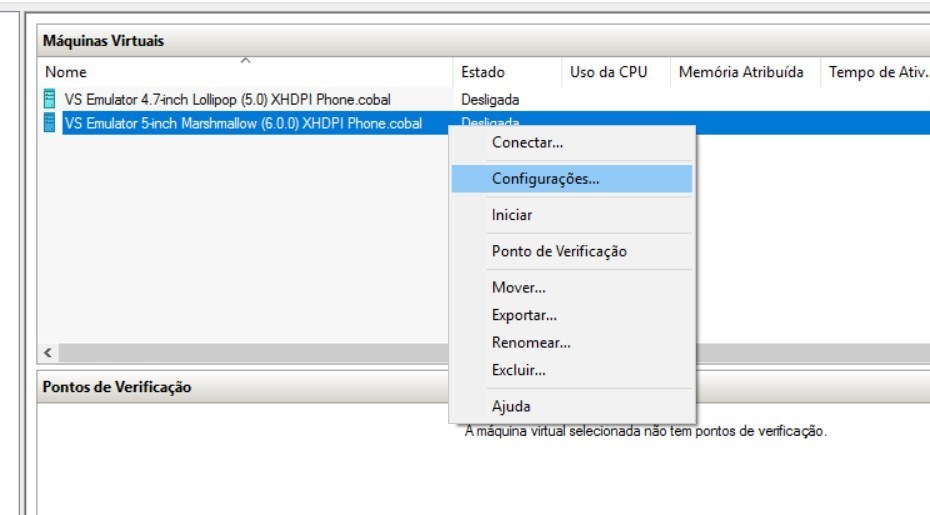
Fig.1
In the side menu, open the processor tree. Select the Compatibility item. Check the box “Migrate to a physical computer with a different processor version” (Fig.2) which will be unchecked.
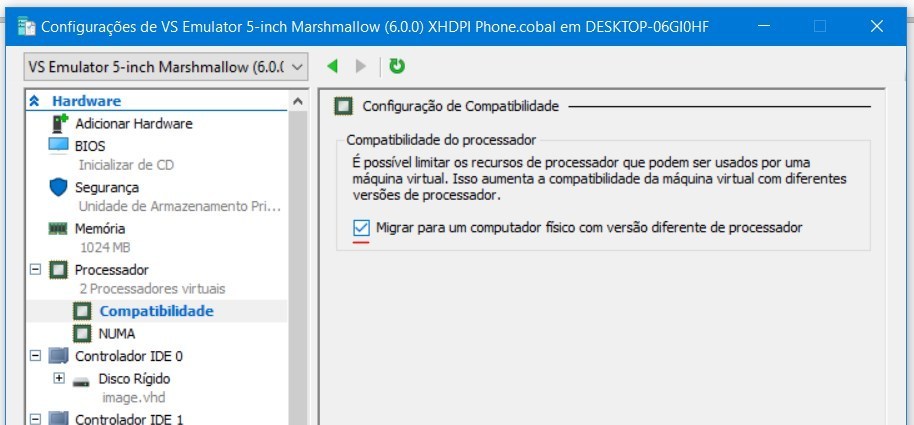
Fig.2
Confirm and close all Hyper-V windows. Go back to Visual Studio and try running the project again.
This should solve the problem. It worked for me.
Comments